ReFill Meter Instructions
IMPORTANT SAFETY INFORMATION:
Always read this manual first before attempting to install the Fill it Forward ReFill Meter. For your safety, always comply with all warnings and safety instructions contained in this manual to prevent personal injury or property damage.
For support, please contact support@fillitforward.com or call 1-888-824-7375
Important Instructions
When installing the Fill it Forward ReFill Meter, basic precautions should always be followed to reduce the risk of electric shock, water leaks and injury to persons, including the following:
- Read all instructions before using the ReFill Meter.
- Do not install or operate any ReFill Meter with a damaged cord or if the ReFill Meter has been dropped or damaged in any manner, contact Fill it Forward’s Customer Success at 1-888-824-7375 or email us at info@fillitforward.com.
- Do not use outdoors.
- When installing the ReFill Meter, ensure the water supply has been turned off before cutting into the ¼ or ⅜ supply line.
- When disconnecting the ReFill Meter, ensure the water supply has been turned off.
- Do not modify the ReFill Meter. Use it only as described in this manual. Any other use not recommended by the manufacturer may cause electric shock or injury.
- Do not loosen or tamper with any case screws on the ReFill Meter body. All connections are to be made without opening the ReFill Meter body.
- Do not insert or allow foreign objects to enter the USB port or quick-connect adaptors. Damage to these components could result in product failure, electric shock, or faulty plumbing connections.
- Always use a certified plumber for installation.
- Always use properly grounded outlets that conform to local code.
Installation
⚠WARNING: ANY INSTALLATION AND SERVICE WORK SHOULD BE PERFORMED BY QUALIFIED AND AUTHORIZED PERSONNEL. ALL INSTALLATIONS MUST COMPLY WITH ALL LOCAL CODES AND BY-LAWS, AND INSPECTED AND APPROVED FOR OPERATION BY LOCAL GOVERNING AUTHORITY PRIOR TO USE.
⚠WARNING: Construction and electrical wiring must comply with local building codes and other applicable regulations to reduce the risk of electric shock, water leaks and injury to persons.
⚠Warning: Do not loosen or tamper with any case screws on the ReFill Meter body. All connections are to me made without opening the ReFill Meter body.
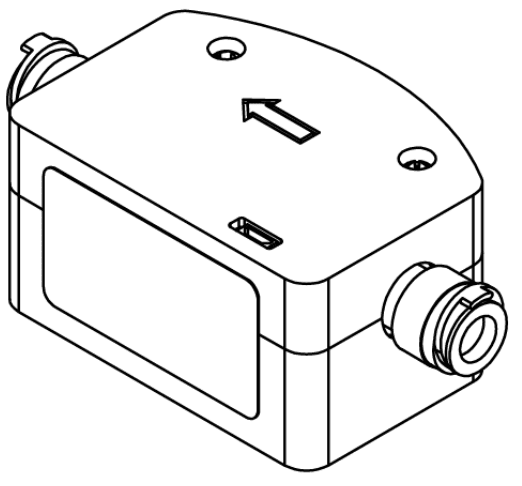
- Note the required direction of the ReFill Meter assembly by the arrows located on the case. The arrow must be installed in the direction of the water flow.
- For retrofit installations, ensure the water source and the power supply to the water fountain have both been shut off.
- Cut through the ¼ or ⅜ water supply line in a location within the water fountain assembly that can accommodate the ReFill Meter.
- Connect the ReFill Meter in the direction of the water flow using the quick-connect adaptors on either side of the ReFill Meter. Verify that the tubing is pushed all the way into the connections by ¾ of an inch. Ensure the blue ‘C-clips’ are engaged to stop accidental removal of the tubing.

Plumbing Installation Checklist
- Ensure the ¼ or ⅜ line is ¾ inch inside the push connection
- Ensure the direction is the same way as the water flow
- Ensure the blue ‘C-clips’ are on the connections
- Monitor connection points once water is turned back on to ensure no leaks
- Plug the ReFill Meter in via the micro USB port and charger block. There should be a flashing green light from within the case near the USB port to confirm power supply.

- Once the meter is powered, navigate to the wifi settings on a mobile device or laptop. The device should appear as Refill_Meter_##

- Navigate to the IP address 192.168.4.1 in any internet browser on the same device. Add the exact wifi name and password for the device to connect to and press “save and connect”. Once connected, this is a secure SSH connection to your wifi. The page will disappear as the meter restarts itself.


Wifi Connection Checklist
- Wait 60 seconds
- Check your available wifi connections
- If the meter no longer shows up in your available connections, the wifi connection was successful
- Use zip ties to secure the ReFill Meter to the appropriate location within the fountain assembly to ensure no interference with access panels or other adjustable components.
FAQ
What happens if the wifi goes out?
- The device will continue to look for the same wifi credentials that were entered previously, as long as it is still powered on.
What happens if the power goes out?
- When booting, the device will look for the past wifi credentials on start up. If these are not found, it will be the same setup process as above.
What happens if the wifi name or password changes?
- The device needs to be rebooted. This can be done by unplugging it and plugging it back in again. It would then be the same process as above to add the new network name and password.
Is the meter food safe?
- Yes, the flow sensor that the water runs through is made of food-grade POM.
What happens if the meter stops working, or we do not want to be in the program anymore?
- The meter can stay installed and be unplugged and will still allow the water station to function like normal. If the meter is not functioning as expected, reach out to support@fillitforward.com.
How do I see my meter stats?
- You will receive an email to create an account at reuse365.fillitforward.com.